There are bugs that require a massive refactor.
And then there are bugs that make you spend hours reading API documentation only to discover that the fix is basically one field.
This was the second kind.
I was working on the social publishing system for my site, mrobles.work, where I can automatically or manually share my blog posts and series to LinkedIn.
The post itself was publishing correctly.
The title was there.
The description was there.
The link worked.
But the image?
Gone.
The First Suspect: Open Graph Metadata
My first thought was the obvious one:
Maybe LinkedIn can't read my
og:image.
So I checked the actual page.
The page had the correct Open Graph metadata.
The image URL was publicly accessible.
The page returned HTTP 200.
And LinkedIn's own Post Inspector confirmed that it could scrape the page and find the image.
It literally showed:
Image — We used the value from the provided Open Graph tag.
So the website wasn't the problem.
That was already interesting.
LinkedIn could see the image.
But when I actually published the article through the API, the resulting LinkedIn post sometimes had no image.
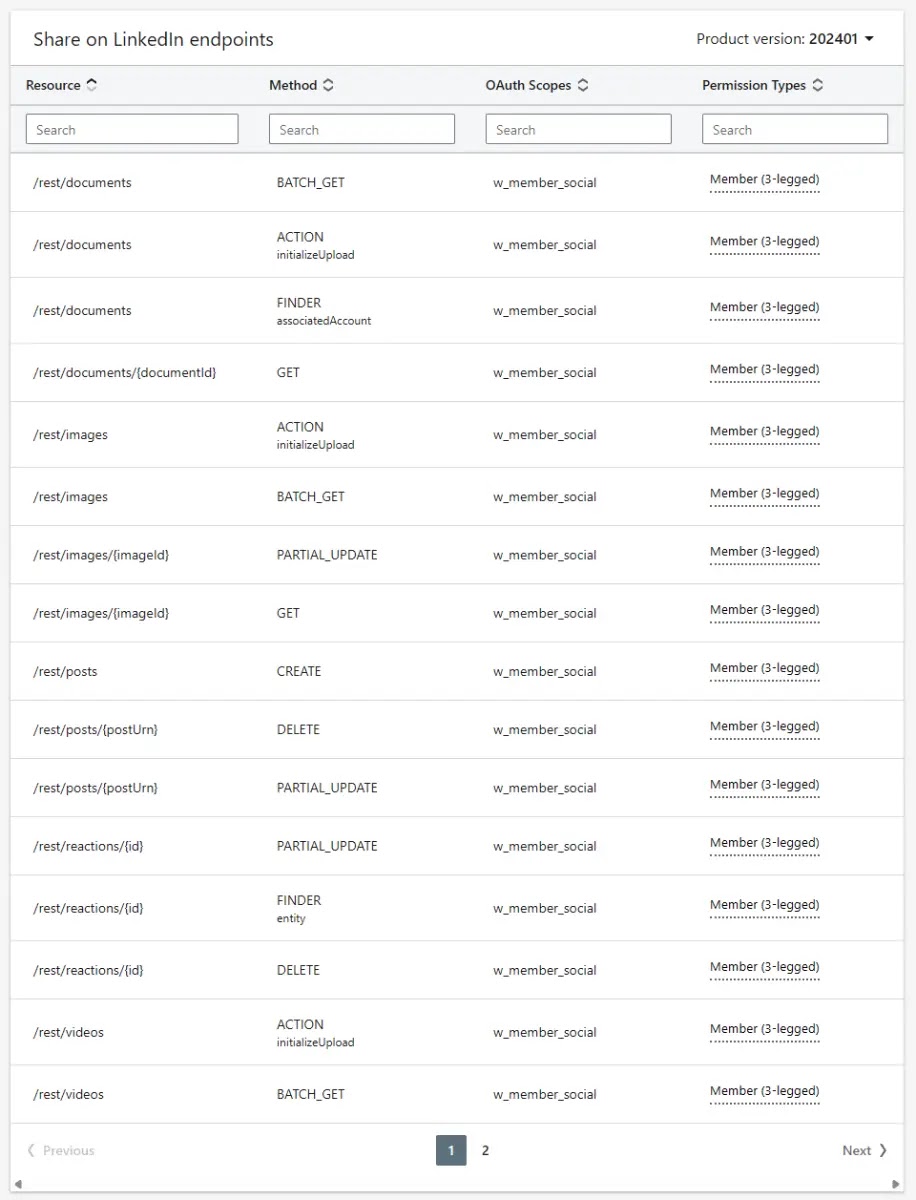
https://learn.microsoft.com/en-us/linkedin/consumer/integrations/self-serve/share-on-linkedin
Down the Rabbit Hole
My publishing implementation was using LinkedIn's UGC Posts API.
The article payload looked roughly like this:
{
  "shareMediaCategory": "ARTICLE",
  "media": [
    {
      "status": "READY",
      "originalUrl": "https://mrobles.work/series/the-rabbit-hole-files",
      "title": {
        "text": "The Rabbit Hole Files"
      },
      "description": {
        "text": "A series walking down the rabbit hole."
      }
    }
  ]
}
At first glance, that looks completely reasonable.
I'm giving LinkedIn the URL.
LinkedIn crawls the URL.
LinkedIn finds the Open Graph image.
Everyone goes home.
Except that's not what consistently happened.
So I started looking at the API schema instead of guessing.
And there it was.
The article media object supports a thumbnails field.
More specifically:
"thumbnails": [
  {
    "url": "https://example.com/image.jpg"
  }
]
The important part wasn't that LinkedIn could discover the image.
It was that I could explicitly tell LinkedIn which image to use.
And my code wasn't doing that.
The Actual Bug
The funny part is that the image was already available.
My content pipeline was already producing:
coverImage
for both blog posts and series.
The data was making its way all the way to the LinkedIn publisher.
But when the publisher detected:
canonicalUrlit chose the ARTICLE publishing path.
And that path only forwarded:
originalUrltitledescription
The coverImage simply disappeared at that point.
The image wasn't broken.
The metadata wasn't broken.
The API wasn't necessarily broken.
My payload was incomplete.
Classic.
The Fix
The fix ended up being tiny.
I changed the article payload builder so it could accept an optional thumbnail URL.
Then the LinkedIn publisher passed the existing coverImage into it.
The resulting payload became:
{
  "shareMediaCategory": "ARTICLE",
  "media": [
    {
      "status": "READY",
      "originalUrl": "https://mrobles.work/series/the-rabbit-hole-files",
      "thumbnails": [
        {
          "url": "https://mrobles.work/images/series/the-rabbit-hole-files.jpg"
        }
      ]
    }
  ]
}
That's it.
No new OAuth flow.
No new API product.
No migration to another LinkedIn API.
No changes to Facebook.
No changes to Discord.
No changes to the queue.
Just passing the image that the system already knew about.
The Nice Part: Both Publishing Paths Were Already Covered
One thing I wanted to make sure of was that I wasn't fixing only one way of publishing.
My system has two paths:
Manual Share
    ↓
Social Share Service
    ↓
LinkedIn Publisher
and:
Auto Publish
    ↓
Publishing Queue
    ↓
LinkedIn Publisher
Both eventually reach the same LinkedInPublisher.
So fixing the publisher meant the fix automatically applied to both.
That was a nice architectural win.
No duplicated fix.
No second implementation.
Testing It
I added tests around the payload builder.
One test verifies that when a thumbnail exists:
thumbnailUrl
    ↓
media[0].thumbnails[0].url
And another verifies that when there isn't a thumbnail, the thumbnails field isn't added.
That second part matters.
I didn't want to accidentally change the existing payload for posts that don't have a cover image.
The result:
TypeScript       ✅
Unit tests       11/11
Working tree     ✅ clean
Production       ✅
And then came the real test.
I published an actual article.

The image showed up.

The Part That Made Me Laugh
I had already spent time investigating LinkedIn's crawler.
I had checked the Open Graph metadata.
I had checked the Post Inspector.

I had even looked into whether the newer /rest/posts API would solve the problem.
That investigation led to another rabbit hole involving LinkedIn API products, consumer versus marketing tiers, organization publishing, OAuth scopes, and page permissions.
And eventually the answer was:
Don't change any of that.
The existing API was fine.
The existing architecture was fine.
The existing image was fine.
I just wasn't putting the image in the payload.
That's software engineering sometimes.
You can spend an afternoon investigating the entire ecosystem around a bug and eventually discover that the actual fix is sitting three layers below the thing you were investigating.
What I Learned

The biggest lesson wasn't actually about LinkedIn.
It was about debugging integrations.
When an external API behaves strangely, it's tempting to immediately blame:
the platform,
caching,
authentication,
API versions,
undocumented behavior,
infrastructure,
or some mysterious third-party limitation.
Sometimes those are absolutely the problem.
But before changing architecture, I want to ask a simpler question:
What exactly are we sending?
Not what we think we're sending.
Not what the UI appears to be sending.
Not what the documentation says is possible.
The actual wire payload.
In this case, the answer was:
We weren't sending the image.
And once that became obvious, the fix was almost embarrassingly small.
Farmer Arc Lesson #Whatever
The Farmer Arc continues.
Plant a feature.
Water it.
Deploy it.
Watch it break.
Read 14 pages of API documentation.
Question your life choices.
Discover one missing property.
Add the property.
Deploy five minutes before the Railway usage limit.
Watch it work.
Go back to farming.
Sometimes that's the job.
And honestly?
I kind of like it.